


Articles
How Shopify's Account Component Ends the Login Page Detour
3/3/2026
For years, the customer account experience on Shopify storefronts followed a familiar and frustrating pattern. A shopper clicks the account icon, gets whisked away to a separate login page, and suddenly they've lost their browsing context entirely, evaporating the purchaser's momentum, making the basket feel further away. Shopify has now addressed this friction head-on with the release of the <shopify-account> web component, a drop-in UI element that embeds a fully functional account sheet directly into the storefront header. This component represents one of the most meaningful improvements to the customer journey in recent Shopify platform history.

What Is the Shopify Account Component?
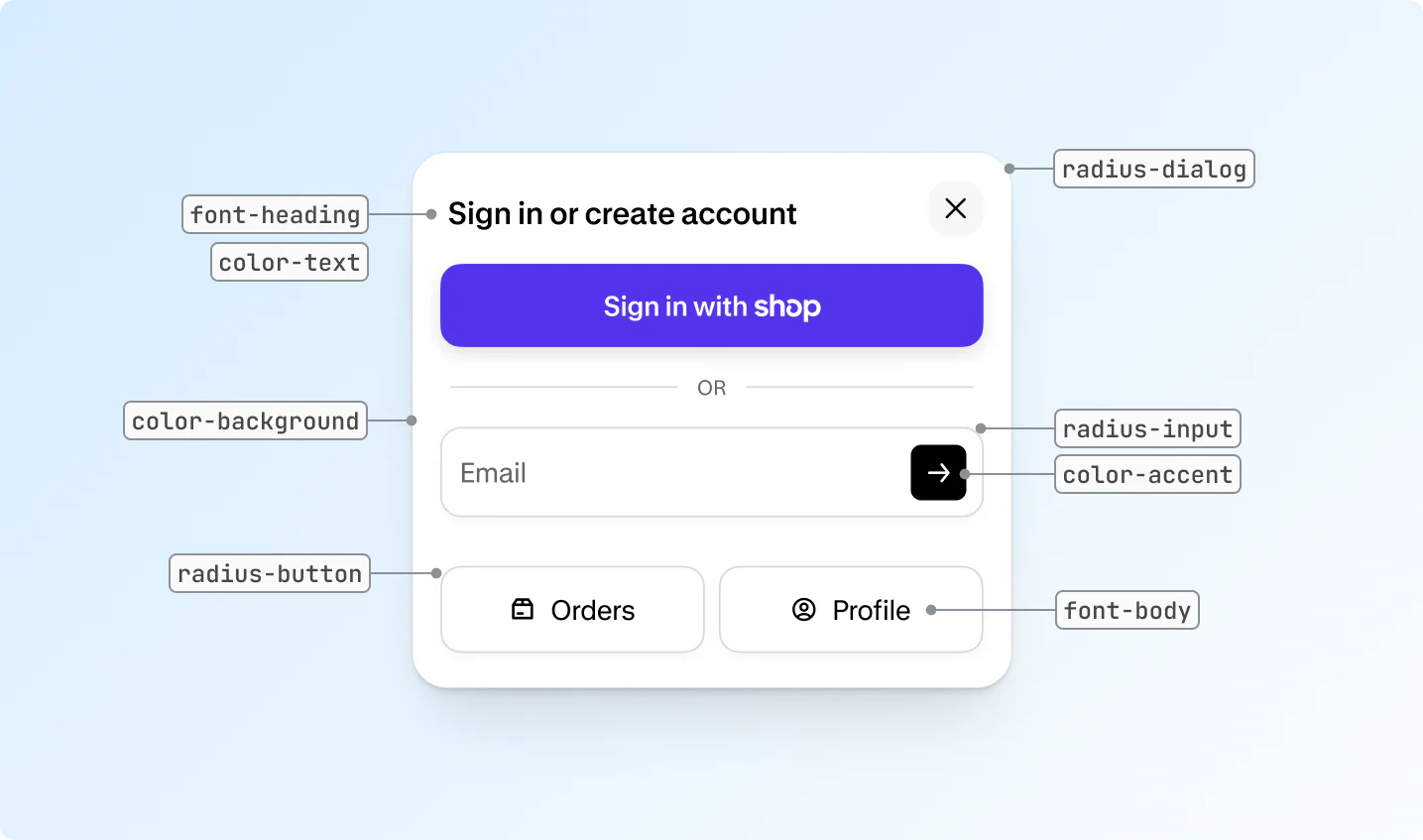
The <shopify-account> component is a native web component hosted and maintained by Shopify. It renders a smart customer avatar in your theme's header, and when a shopper clicks it, a sleek account sheet slides open in-page. No redirect, no new tab, no loss of context.
The sheet handles the complete customer account journey from a single, non-disruptive overlay:
- Sign-in or account creation for new visitors
- Passwordless sign-in via email magic link
- Automatic recognition and one-tap sign-in through the Shop app
- Social sign-in via Facebook and Google
- Quick navigation to Orders and Profile for returning customers

The Problem It Solves
The traditional account flow on Shopify, and across e-commerce broadly, has always involved a context switch. Click the account icon, get redirected, authenticate, get redirected back. Every one of those steps is an opportunity for drop-off.
Research consistently shows that friction at the account and checkout stage is one of the leading causes of cart abandonment. Asking customers to navigate away from the product they were just viewing breaks the purchaser’s intent at exactly the wrong moment.
The <shopify-account> component eliminates this context switch entirely, with the account sheet opening as an overlay, the shopper authenticates without leaving the page they're on, and the path back to checkout is immediate and uninterrupted.
How the Shop Integration Removes Sign-In Friction
One of the most powerful aspects of the component is its deep integration with Shopify's Shop app, their consumer-facing app for tracking orders and discovering products. For the growing base of customers who already use Shop, the account experience becomes near-instant.
Shop recognition automatically detects when a customer's email or device is associated with a Shop account, enabling a passwordless, one-tap sign-in. There's no password to remember, no verification email to wait for. The shopper is authenticated and ready to proceed to checkout in seconds.
This is not a minor convenience feature. For merchants with a returning customer base, this represents a meaningful reduction in login friction that directly correlates with higher repeat purchase rates and faster time to checkout. A returning shopper can be identified, authenticated, and on their way to checkout in a matter of seconds, without entering a single password or waiting for a verification email.
What This Means for Theme Developers
From a technical standpoint, the <shopify-account> component is designed to be straightforward to implement. Adding it to a theme header requires just a few lines of Liquid, conditional on whether customer accounts are enabled for the shop.
Customisation is handled through a well-structured system of CSS variables, allowing developers to match the component's look and feel to virtually any brand identity, adjusting colours, typography, border radius, and avatar sizing without touching the component's core logic.
Because Shopify hosts and controls the component, all updates are delivered automatically. New sign-in methods, UX improvements, and security patches roll out without theme developers needing to push a single line of code.
Key Technical Features
- Deep styling control: CSS variables for full visual customisation (colours, fonts, corner radius, sizing)
- Custom avatar slots: Replace the default signed-out avatar entirely with custom HTML via the signed-out-avatar slot
- Merchant-managed menus: Tie the component to any navigation menu managed from the Shopify admin
- Automatic updates: New sign-in methods and UX improvements deploy to your theme without code changes
Available Now in Horizon Themes
The <shopify-account> component is available today in the latest versions of Shopify's Horizon themes. Merchants running a Horizon theme can update immediately to get the component live on their storefront.
For theme partners building on other frameworks, Shopify has published full documentation covering both standard Liquid theme integration and Hydrogen (headless) implementations, giving developers everything they need to get started.
It is also worth noting that the <shopify-account> component will soon be a mandatory requirement for all themes submitted to or updated in the Shopify Theme Store. For theme developers, adding the component now rather than waiting for that deadline is the straightforward path forward.
The Bigger Picture
This component sits within a broader Shopify strategy of reducing friction at every stage of the purchase journey. Alongside improvements to Shop Pay, one-page checkout, and customer account personalisation, the <shopify-account> component is part of a cohesive push to make the storefront experience feel less like a series of separate pages and more like a single, fluid interaction.
For merchants, the benefit is straightforward, fewer drop-offs at the account stage, faster routes to checkout for returning customers, and a more modern storefront experience that matches the expectations of today's shoppers.
For developers and theme partners, it's a signal of Shopify's direction. Platform-level components that handle complexity automatically, whilst leaving room for meaningful brand-level customisation.