

Guides
Breaking Shopify's URL Limits: Custom Routing with Cloudflare Workers

Bruce Mead
CTO & Founder
15/12/2025
Migrating to Shopify Plus usually involves giving up your established URL structure, but high-volume merchants cannot afford the SEO risk of standard redirects. We utilised Cloudflare Workers to intercept and rewrite traffic at the edge, allowing a major client to keep their legacy paths intact. Read the technical breakdown of how we bypassed Shopify's native routing limits to ensure zero disruption to organic traffic.

Migrating an enterprise store to Shopify Plus usually involves a painful compromise. You often have to give up your established URL structure.
Legacy platforms like Magento or WooCommerce allow completely custom hierarchies, such as example.com/category/mens-shirts. Shopify famously locks merchants into its rigid Shopify URL structure, including /products/, /collections/, and /pages/.
For most merchants migrating to Shopify, a Shopify URL redirect strategy using 301s is the standard answer to preserve traffic from their legacy URLs. However, for our recent client, a 301 strategy was simply not enough.
We were tasked with migrating a business with a turnover exceeding $100m. They drive a vast volume of organic traffic and operate under a very strict SEO strategy. For a business of this scale, introducing new variables into their traffic pipeline was not an option. Reducing SEO risk during the migration was a mandatory requirement.
At B2, we used Cloudflare Workers to eliminate these variables entirely. By sitting in front of Shopify, we can rewrite traffic at the edge. This allows you to serve Shopify content on your existing URL structure without needing to change URLs in Shopify or rely on extensive Shopify URL redirects.
Let us look at the exact technical implementation we used to map /collections/ to /category/ to preserve their legacy structure.
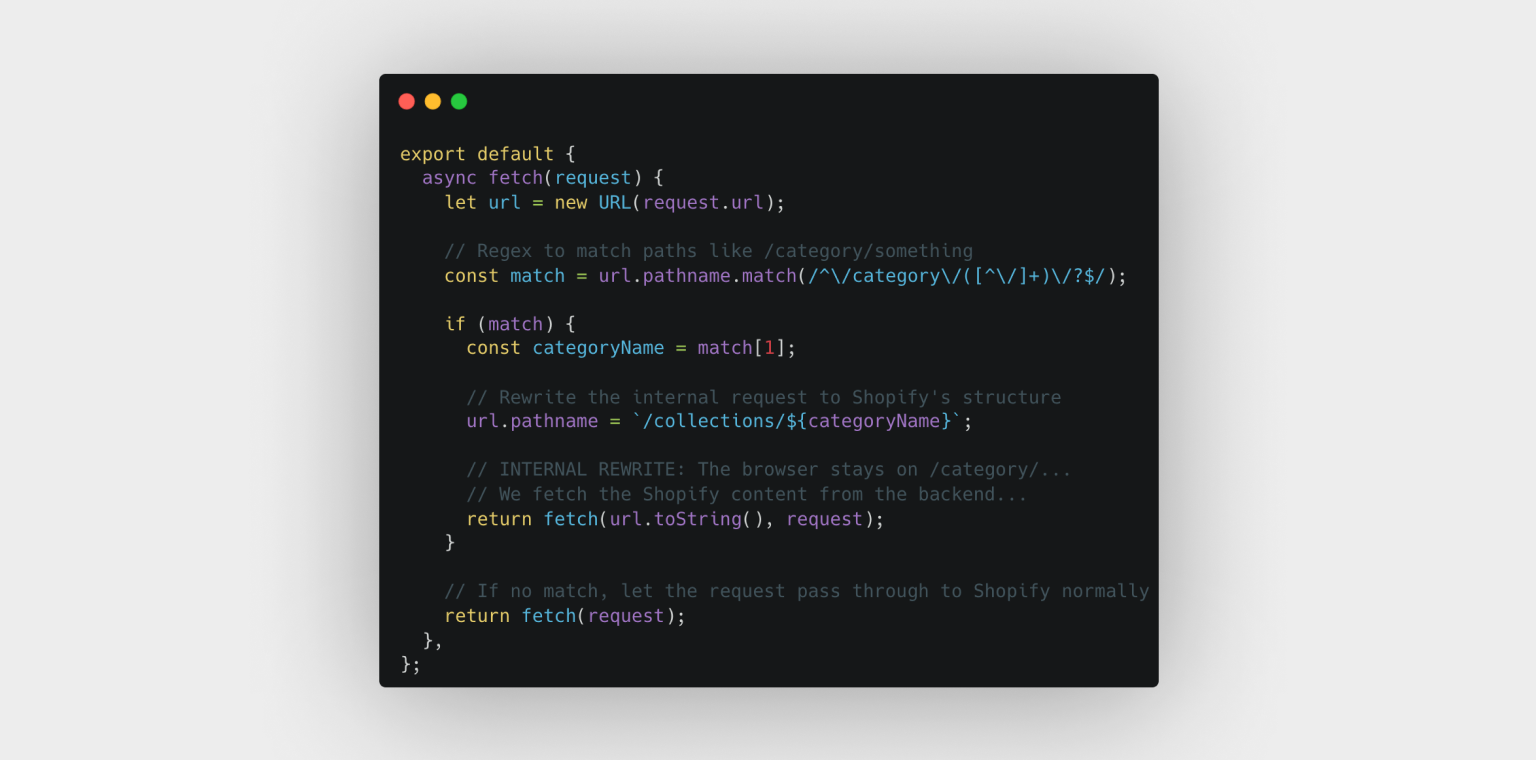
1. The Traffic Manager: URL Rewriting Worker
The first step involves a Worker that intercepts incoming requests. When a user visits /category/summer-sale, the Worker silently fetches content from /collections/summer-sale on Shopify. Crucially, it serves this back to the browser without changing the URL.
This is a rewrite rather than a redirect. The user never knows they are viewing a Shopify collection page.
This approach avoids the need to change the URL in Shopify, change collection URLs in Shopify, or manage thousands of redirect URLs in Shopify during a migration.
Why this matters
Standard migrations rely on 301 redirects in Shopify which tell Google a page has moved. While generally safe, redirects can bleed small amounts of link equity and disrupt analytics data. An edge rewrite keeps the original URL alive which preserves years of SEO history flawlessly. For our $100m+ client, this meant zero disruption to their primary acquisition channel.
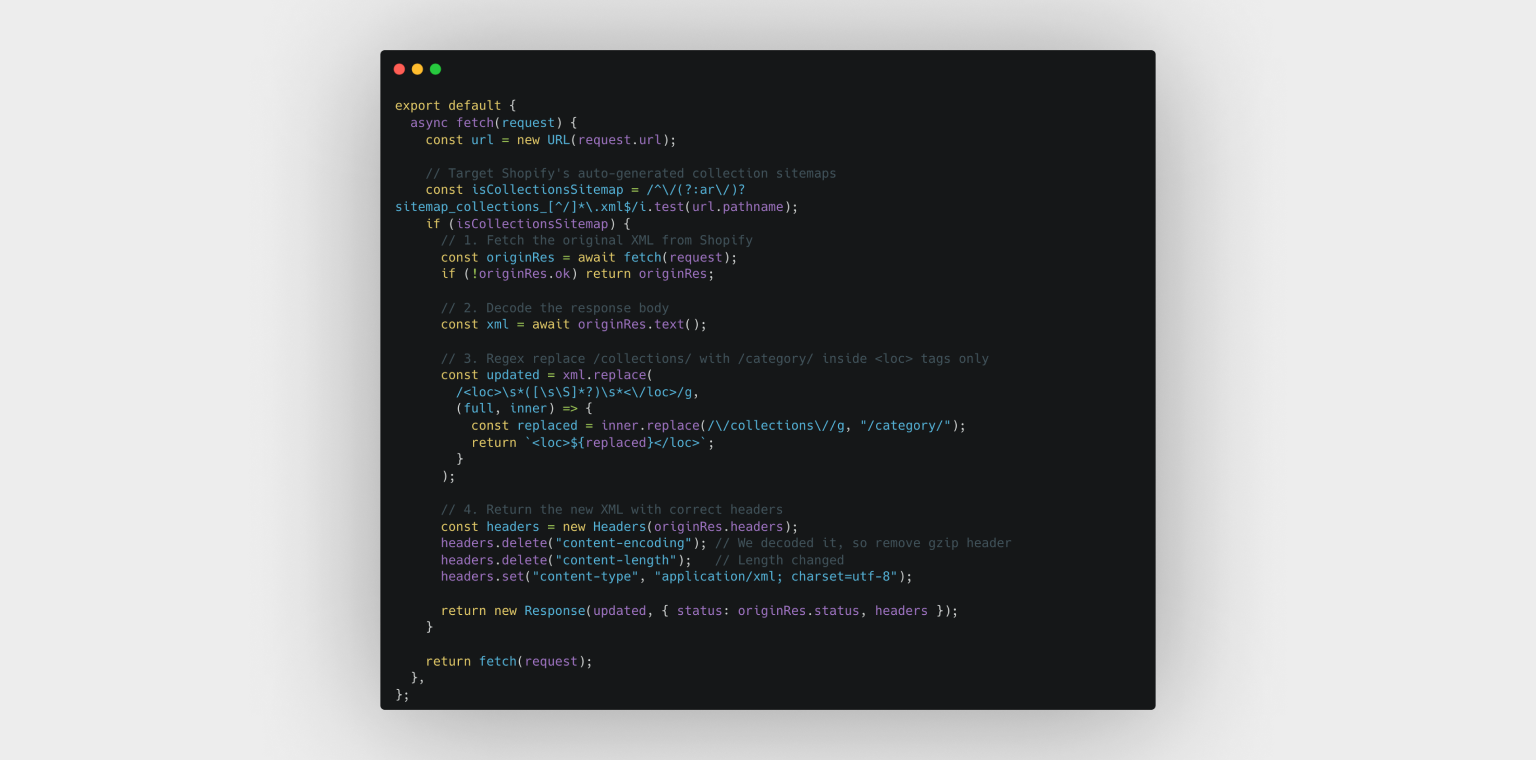
2. Dynamic Sitemap Modification
Rewriting the frontend is only half the battle. If you serve pages at /category/ but your sitemap.xml still lists them as /collections/, you create a dangerous canonical conflict that confuses Google.
Shopify automatically generates sitemaps and does not allow you to edit them directly - a frequent blocker for teams researching how to change the Shopify URL structure. We solve this by intercepting the sitemap request at the edge and modifying the XML on the fly before it reaches Googlebot.
3. The Frontend: Liquid Logic
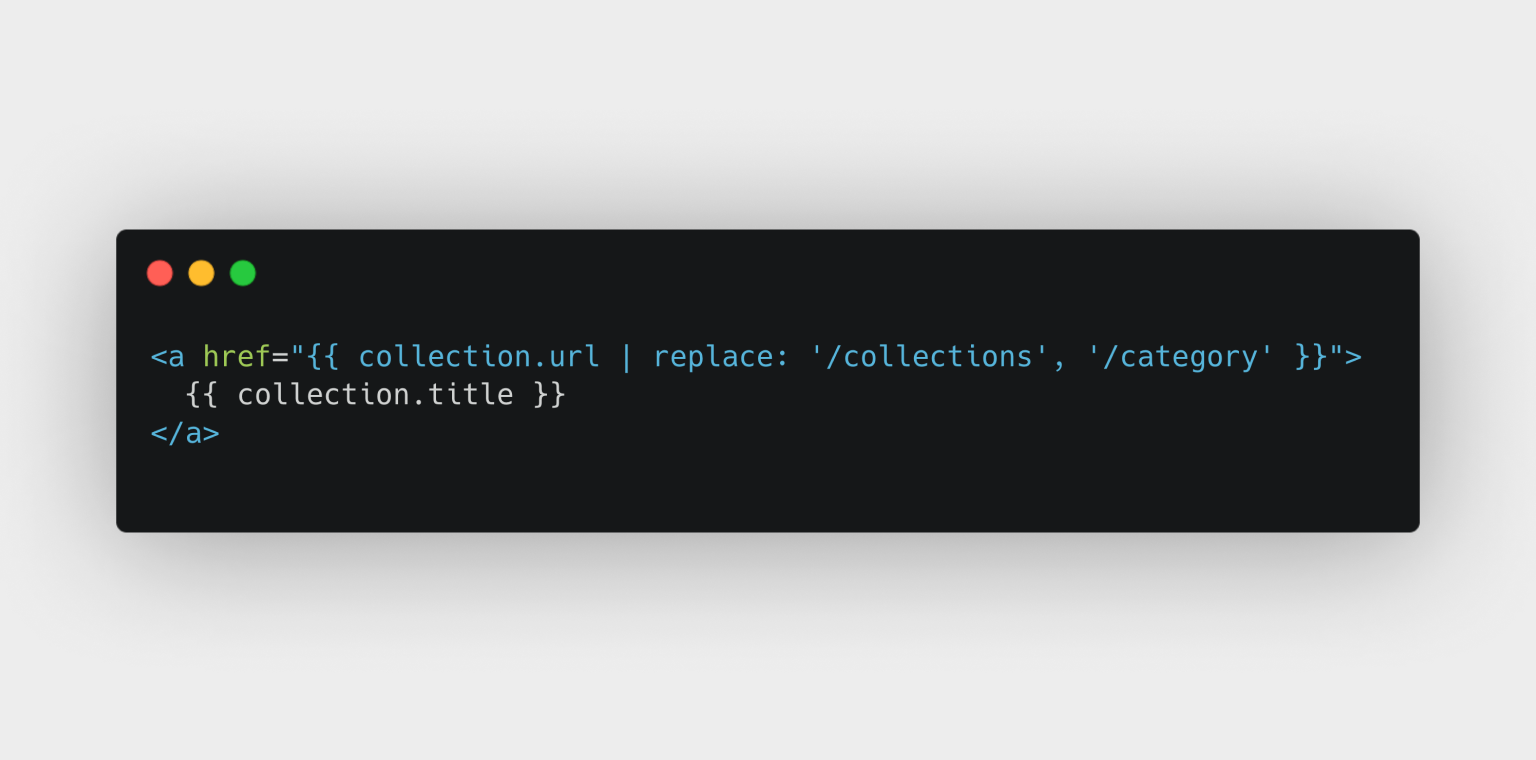
Finally, the Shopify theme itself must generate links using your new structure. If your navigation menu still points to /collections/, the rewrite is wasted.
We use simple Liquid string filters to align the frontend with our Edge logic:
By applying this filter globally, or via a custom snippet, every link on your storefront automatically adheres to the new structure without needing to change product URLs in Shopify, change page URLs, or maintain complex Shopify URL redirects.Summary: Why Go Edge-Native?
This approach offers the flexibility of Headless with the simplicity of Liquid.
- Risk Mitigation: Ideally suited for high-volume merchants where SEO volatility is unacceptable.
- Zero SEO Loss: Keep your legacy Magento or WooCommerce URLs exactly as they are.
- No Server Maintenance: These scripts run on Cloudflare's global network and scale instantly with traffic.
Is your URL structure blocking a migration to Shopify Plus?
Contact us to discuss how we can engineer a custom routing layer for your store.